CC40 owners / Setup & support
Set up your CC40.
Your CC40 arrives programmed for your truck, with the cable that fits already chosen. Setup takes a few minutes. After that, keep it plugged in and keep the check engine light off.
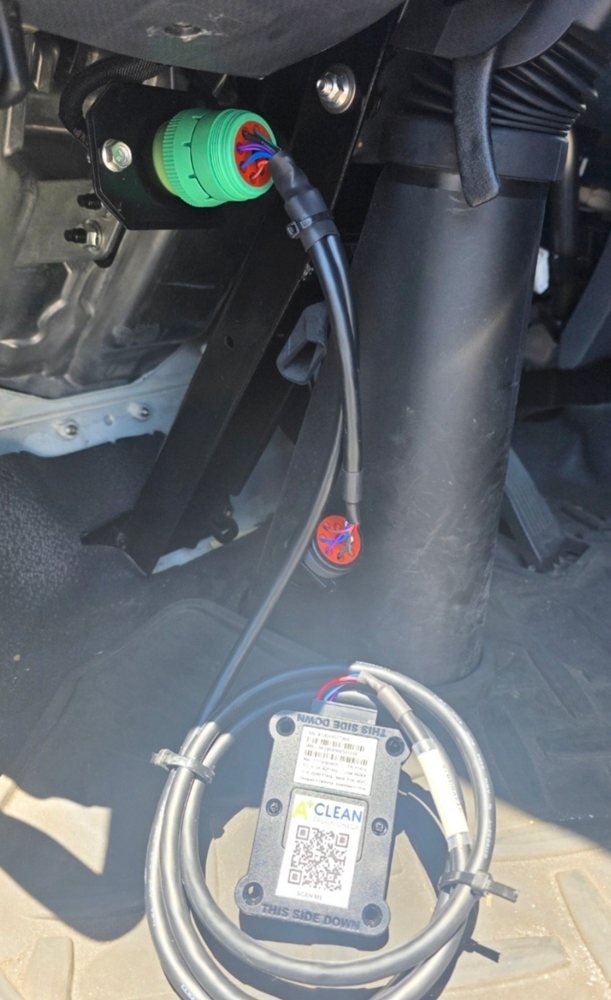
Your CC40 arrives programmed for your truck, with the cable that fits already chosen. Setup takes a few minutes. After that, keep it plugged in and keep the check engine light off.
A round green 9-pin socket (J1939), usually low on the kick panel or under the dash, or a 16-pin OBD connector (J1979) under the dash near the steering column. Your cable already matches it.
9-pin: the green end goes into the truck’s port; the black spare connector is for an ELD or GPS you already run. 16-pin: the plug goes into the truck’s OBD connector; the spare 16-pin socket takes the ELD or GPS. The CC40 must connect directly to the truck’s own port, never behind another device.
Let it idle for about 20 minutes. The lights flash while it sets up. When all three lights stay on steady, it’s ready.
Mount it label-side up and tie the cable under the dash, clear of the pedals. Each CC40 stays with its own truck.
Keep it plugged in. Keep the check engine light off. CC40 handles the testing.
Your CC40 arrives set for four tests a year. When a testing window opens, it waits until the engine is running and the truck’s computer is ready, then runs the test. A test takes about a minute.
It tries again the next day, and every day until the window closes, at no charge. Every test goes to CARB, pass or fail. A failed result isn’t a penalty; it means the truck isn’t compliant yet.
Every result shows on the truck in your CTC-VIS account. We also keep an eye on every enrolled truck and contact you if something needs attention.
Repairs, reporting the truck in CTC-VIS, and paying CARB’s annual compliance fee there. An unpaid fee can hold up registration even after a passing test. Why it matters.
Check that the engine is running and the cable is in the truck’s own diagnostic port, not behind another device. Still not steady? Text us a picture of the device and the port.
It depends on the device. Make sure the ELD or GPS is in the spare connector on the CC40 cable. If it still acts up, text us a picture and we’ll check it.
Get the truck repaired. The CC40 doesn’t repair anything; it reports what the truck reports. Once it’s fixed, drive the truck until it’s ready and the next test goes through on its own.
The truck’s computer needs drive time to finish its self-checks. Keep driving it normally. The CC40 keeps trying through the testing window.
Call us before you move the CC40. Each device is programmed to one truck. Any continuing rate lock is stated in your service agreement.
Check that the truck is reported in CTC-VIS and the annual compliance fee is paid there. A passing test alone doesn’t make a truck compliant. The three things CARB needs.
Drop your email and we'll send compliance heads-ups and let you know when we're testing in your area — so you can plan testing ahead of your due dates. English or Spanish. No spam, unsubscribe anytime.
Need help with your CARB account?
Use CTC-VIS for vehicle reporting, annual fees, due dates and compliance status. CARB support is separate from A+ Plus testing.